
Tutorial
ltx-2.5-fast/audio-to-video in Practice: 5 Practical Audio-Driven Video Scenarios
A scenario-selection and implementation checklist for developers, from API integration to cost estimation
On this page
Why Choose the Audio-Driven Video Route
Text-to-video workflows usually start with a script or prompt, then let the model "guess" the visuals and pacing, with audio added in post-production. Audio-to-video reverses the order: audio is the sole driving signal, and the visuals are generated around the sound's timeline. For developers, this difference determines the design of the entire pipeline.
Taking ltx-2.5-fast/audio-to-video as an example, its output type is video and its input is an audio clip. How the model internally aligns lip movement, beats, and visuals is outside our control. What we can control is: what audio to provide, how long it should be, and which business process it fits into.
When your requirements meet any of the following, this route is a natural fit:
- You already have a "content-complete" audio clip—a podcast, course recording, voiceover, or music—and it is itself the product; the video is merely another presentation form of it.
- You care about the sense of audio-visual synchronization rather than precisely describing a visual detail in text. Text-to-video requires repeated prompt tuning, whereas audio-driven video delegates "pacing" to the sound itself.
- You need batch output. The same audio-processing logic can be reused across different assets, making the pipeline easier to standardize.
Conversely, if your core need is "precisely control the composition and camera movement with a single sentence," audio-driven video is not the optimal solution; forcing it will only increase debugging overhead.
If you have confirmed you want to proceed, you can view the model's API information here: /models/ltx-2.5-fast-audio-to-video.

Calculate Costs First: Budget Model Under Per-Second Billing
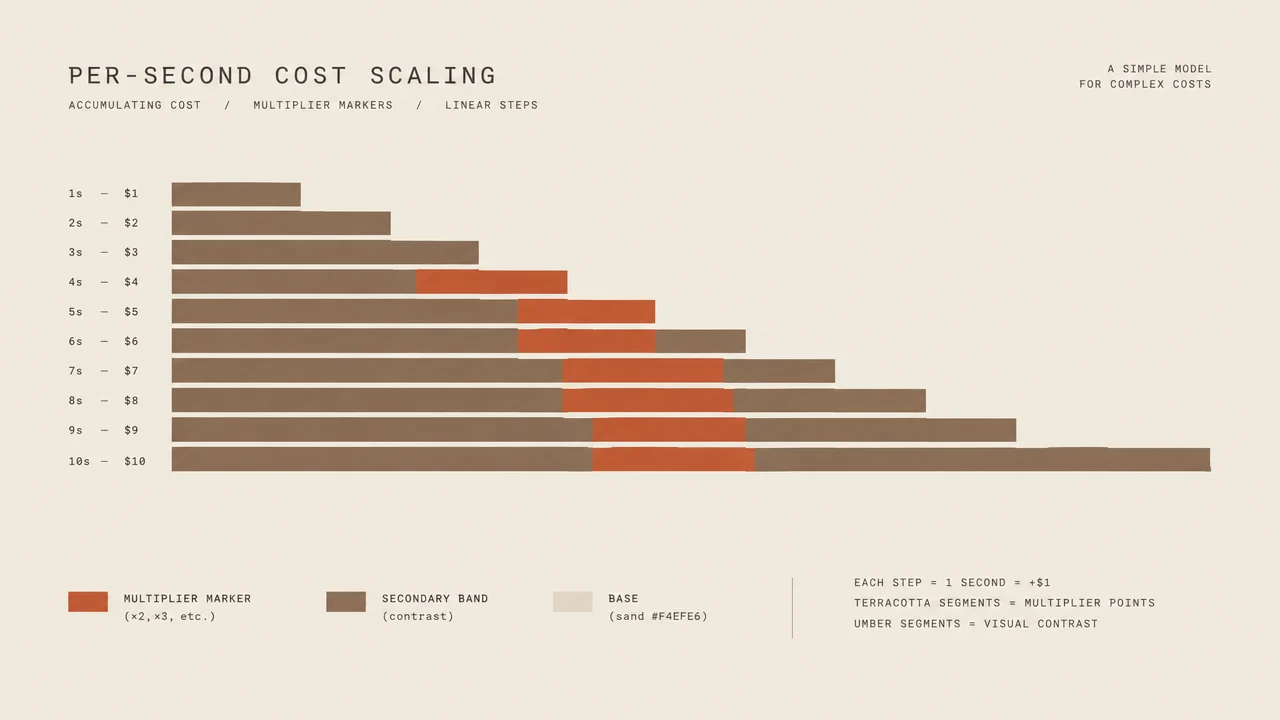
ltx-2.5-fast/audio-to-video is billed by input audio duration, with a current unit price of $0.1858 per second. This is a linear model: total cost = input audio seconds × unit price. There are no resolution tiers, making estimation very straightforward. Input audio must be between 2 and 20 seconds.
What really needs to be taken seriously is where the "seconds" variable comes from. It comes from the input audio duration: billing is calculated by input audio seconds, and the audio must be between 2 and 20 seconds. Assets outside this range need to be trimmed before submission. So estimation breaks down into three steps:
- Determine the duration of a single output. A 6-second spoken-word clip and an 18-second course segment will have noticeably different per-item costs. Decide the product form first, then the seconds.
- Determine the batch multiplier. How many items must be produced per day/week? How many versions does a marketing campaign need? Multiply the item count by the seconds per item to get the total seconds for the period.
- Leave room for retries. Unsatisfactory results require reruns, and failure retries also consume seconds. Empirically, add a certain percentage to the estimated total as a budget buffer; the exact percentage depends on how strict your acceptance criteria are.
Here is an estimation approach (without specific amounts): suppose each input audio is 10 seconds and a campaign needs 20 candidates. You actually need to prepare 200 seconds of generation quota, plus a rework buffer. Writing the formula "candidate count × seconds per item × rework factor" into the requirements document is much less stressful than looking at the bill after launch.
Cost-control measures revolve around this formula: shorten per-item duration, reduce candidate count, and limit retries to the necessary range. Because billing is by output seconds rather than by call count, short-duration, multi-batch strategies are usually more controllable than long-duration, few-batch strategies. Billing is by input audio duration, priced at $0.1858/second. Input audio must be between 2 and 20 seconds. Billing is by input audio duration, priced at $0.1858/second. Input audio must be between 2 and 20 seconds.
Scenario 1: Turning Podcasts and Spoken-Word Content into Short Video Clips
This is the most typical use case: a 40-minute podcast sits in your asset library, and you need to turn it into several short clips publishable on social platforms.
The key decision is clip granularity. Audio-driven video will not help you determine "which segment is the most exciting," so the clip-selection logic must come first: you can manually mark timestamps, or use transcription and keywords for a rough screen. Each extracted audio segment should be semantically self-contained—with a beginning and a conclusion, not cut in the middle of a sentence.
For duration selection, the viewing habits of short-video platforms mean individual clips should not be too long. Shorter clips mean lower per-item cost and also mean the same budget can produce more candidates for selection. A prudent approach is to first batch-generate at a shorter target duration, then separately extend and redo the best-performing segments.
For output acceptance, check at least three things: whether the audio is fully covered (not truncated), whether the visual pacing and speech rate are coordinated, and whether the opening and closing frames have usable stills for covers. The second point requires a human review, because automated metrics struggle to judge "look and feel."
Scenario 2: Visualizing Audio Courses and Training Materials
Teaching audio is characterized by clear structure, longer duration, and high content repetition—the same course may need to be produced repeatedly for different batches of learners. This is exactly where a batch pipeline can add value.
For implementation, it is recommended to split audio by "knowledge point" rather than "whole lesson." One knowledge point, one audio segment, one generated video: this controls per-item cost and also limits the impact of later revisions—if a knowledge point is taught incorrectly, only that segment needs regeneration, without rerunning the whole lesson.
Consistency is the main challenge in this scenario. Model-generated visuals will not maintain a unified style across multiple segments, so do not expect "the entire course to have a completely consistent visual style." A more realistic goal is: each segment is independently watchable, and a unified opening/closing, subtitle style, and packaging template bring the look and feel into alignment. The templated packaging layer is done in your post-production workflow and does not consume generation quota.
For batch output, script the audio splitting, task submission, and result archiving, leaving humans only the two steps of "spot check + publish." Otherwise, operating dozens of segments one by one will become the new bottleneck.
Scenario 3: Visual Previews for Music and Audio Works
Creating a visual preview for music or audio works is a very natural use of audio-to-video: pre-release trailers, dynamic showcases in portfolios, and cover videos for audio platforms.
The boundaries need to be made clear here. The model generates visuals that coordinate with the audio's rhythm; it is not an MV director, does not understand your lyrical narrative, and will not cut on a specific drum hit. Positioning it as "ambient visuals" rather than "narrative video" sets the right expectation.
The strategy for controlling generation duration relates to musical structure. Generating a full song means longer seconds and higher cost, while a preview usually only needs one memorable section. Prioritizing the chorus or theme section for a short preview is a more balanced approach between cost and effect.
For rhythm matching, the model perceives the audio's own intensity changes, but you cannot specify "cut at second 12." If the business has a hard requirement for this, it must be handled in the editing stage rather than expecting a one-shot generation. Generating several candidates and picking the one with the best sense of rhythm is usually the most cost-effective approach.
Scenario 4: Audio-Driven Batch Production of Marketing Assets
Marketing teams often do not need "one video" but "multiple versions of the same content set." The advantage of audio-driven video here is: copy changes land in the audio, the video follows the audio, and version management becomes clear.
The pipeline can be organized like this: finalize script → generate voiceover (multiple languages, multiple versions) → submit each audio version for generation → unified packaging → review and publish. Audio is the "source file" of the entire process; version differences are fixed at the audio layer, and downstream does not need further changes.
For multilingual scenarios, note that different languages have different speech rates. The same copy may have different audio durations in two languages, and the generated videos will therefore have different lengths. If your distribution channels have duration requirements (for example, some placements limit the duration range), control the speech rate or trim the copy at the voiceover stage rather than passively accepting it at the video stage.
The review step cannot be skipped. Batch production means errors are also amplified in batch; if an asset with a misread voiceover is automatically published, the rework cost far exceeds the generation cost. It is recommended to set up an "audio review" before generation and a "spot check" after generation; both gates are cheaper than remediation afterward.
As for batch scale, return to the formula in Section 2: version count × seconds per item × rework factor. Marketing campaigns usually have many versions and short per-item durations, so the total seconds may not be exaggerated, but the rework factor should be generous because marketing asset acceptance standards are often stricter than internal materials.
Scenario 5: Accessibility and Multimodal Content Transformation
The value of this scenario is often underestimated: you have a batch of pure audio assets—interview recordings, meeting-minutes audio, open-course recordings—and they are inaccessible to deaf and hard-of-hearing users and unfriendly in mute environments. Converting these audios into videos with visuals is a lower-cost multimodal transformation.
Note that audio-to-video generates "visuals that accompany the audio"; it does not automatically generate subtitles. True accessibility transformation requires subtitles or a transcript as a separate step; the video visuals are only supplementary. Do not treat generated video as the entirety of accessibility compliance: it solves "having a visual presentation," not "having a text alternative."
There are two more points in accessibility scenarios: first, the visuals should not contain rapid flashing or strong rhythmic changes that could cause discomfort, so a human review is needed after generation; second, the video should have clear title and description metadata so it can be retrieved and understood.
Usage in this scenario is usually concentrated on cleaning up legacy content—batch-processing the backlog of audio assets in one go. It is suitable for scripted batch runs with queues and failure retries, ending when processing is done, without needing to stay online long-term.
Pre-Integration Evaluation Checklist and Common Pitfalls
Confirm the following items one by one before launch; this will prevent most rework.
Input audio quality. Audio with low sample rate, heavy background noise, or multiple people talking over each other directly affects output look and feel. Screen or denoise the assets before integration; do not let the model's output take the blame for input quality.
Duration control. Clarify whether you want a fixed per-item duration or one that follows the audio length. The former requires trimming the audio before submission; the latter means accepting "the video is as long as the audio" and estimating costs accordingly. Also confirm the platform's limits on single-generation duration to avoid long audio being truncated.
Asynchronous tasks and failure retries. Video generation is time-consuming, so design it as asynchronous tasks: submit, poll, persist, callback. The retry strategy must have an upper limit, and failed tasks must be deduplicated to avoid the same audio being submitted multiple times and billed repeatedly. Failure reasons should be recorded to help determine whether it is an asset problem or a temporary fault.
Idempotency and state machine. Associate each task with a unique business-side ID, and clearly distinguish states: "submitted/generating/succeeded/failed/discarded." Without a state machine, when running batches you cannot answer "how many of these 200 actually succeeded."
Cost guardrails. Set an upper limit on total generated seconds on the business side, and alert or pause when exceeded. Under a per-second billing model, a retry task stuck in an infinite loop can drive up usage in a very short time.
Unsuitable scenarios. Anything that requires precisely reproducing a specified image, strict multi-shot narrative, or real-time interactive generation should not use this route. Using it for ambience- and rhythm-driven video has a high success rate; using it for storyboard control has high trial-and-error costs.
After going through this checklist, do a small-scale trial run in your specific business—run the end-to-end process with actual audio and actual durations; it is more reliable than any estimate. The model page is here: /models/ltx-2.5-fast-audio-to-video. Choose the right scenario and control the seconds, and audio-driven video can become a stable, reusable production capability.
Related articles
View all articles →-

Tutorial
Meshy-6 Text-to-3D in Practice: 5 High-Value Application Scenarios and Integration Essentials
-

Tutorial
meshy-6/image-to-3d in practice: 5 high-value use cases and key implementation points
From one image to a usable 3D asset: a cross-cutting view of cost, quality, and engineering integration
-

Tutorial
How to Use ltx-2.5-fast Audio-to-Video via the HiAPI API: curl and Python
A working request walkthrough: auth, audio upload, job polling, and cost planning
14 min read