ByteDance
Seedance 2.5 Flash
seedance-2.5-flash/image-to-video
The ByteDance Seedance 2.5 series video model supports text-to-video, first-frame-based generation, and multimodal reference generation, producing 4 to 30 seconds per output with a choice of 480p or 720p and synchronized audio, making it ideal for rapidly producing short advertising clips and e-commerce product videos
Try seedance-2.5-flash/image-to-video
Input
Showcases
View all showcasesOutput
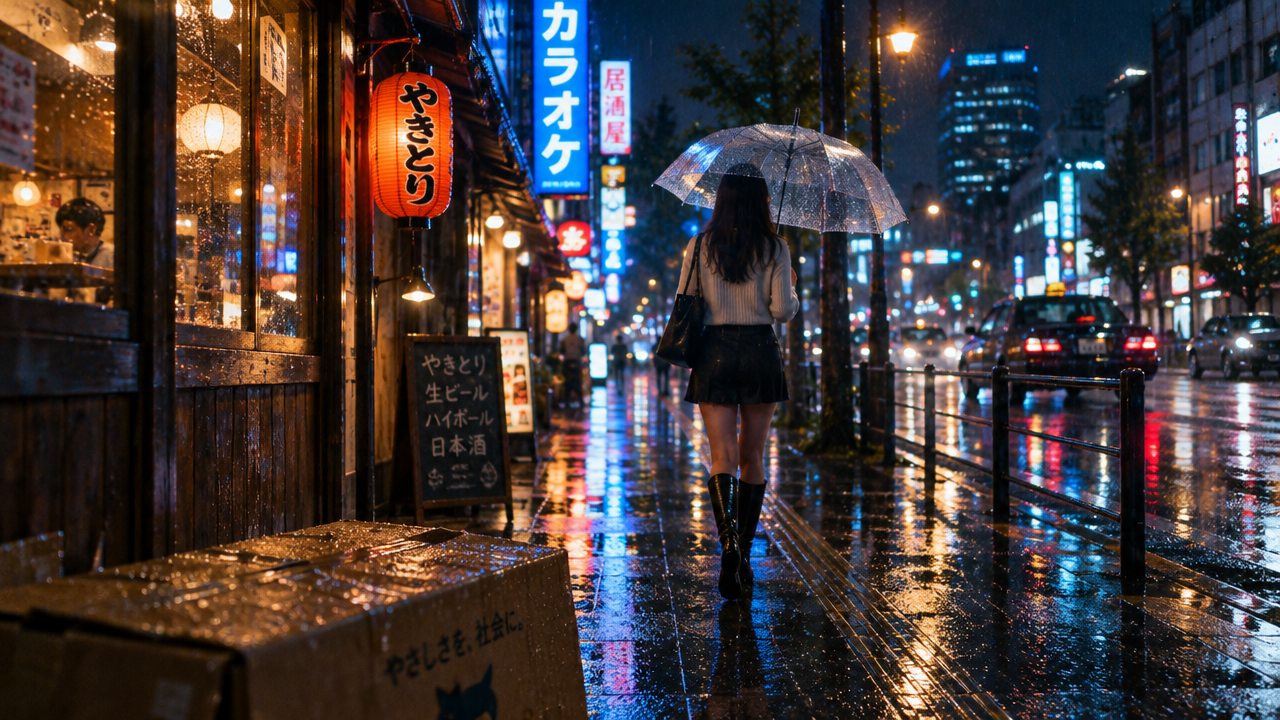
videoRainy Night Intersection · The Girl Who Turned Back with an Umbrella
Style Narrative · Rainy Night · emotional
Reference inputs
first_frame_url
Prompt
A cinematic rainy-night street-corner story. A young woman holding a transparent umbrella walks away from the camera along the wet sidewalk, then slows her pace, turns back, and crouches beside a soaked cardboard box, inside which a shivering puppy is curled up. She tilts the umbrella to shelter the box from the rain and reaches out tentatively; the puppy lifts its head. The camera starts behind her at shoulder height, follows her steps, then circles around and lowers to a low-angle close-up of her face and the puppy, with neon signs blurring in the puddles. Rain streaks across the edge of the lens, warm shop lights interweave with cold blue streetlamps, and reflections flicker on the asphalt. Natural synchronized audio: the sound of rain on fabric and pavement, distant traffic, soft footsteps, faint whimpers, quiet breathing.
Copy the full prompt and adapt it for your own generation.
Tags
Morning Light Pour-Over: Barista Filter Cup Pouring Close-Up
Style Coffee · slow-cinema · Handicrafts
Reference inputs

first_frame_url
Prompt
A barista's hand holds a pour-over kettle, pouring a thin stream of hot water in a slow spiral over a paper filter filled with coffee grounds; the grounds swell and rise into a soft foam dome. The camera starts on a slightly high side angle with a close-up of the filter cup, then glides slowly around the kettle in a gentle arc, keeping the spout and water stream in focus throughout. Steam drifts upward in the warm morning light slanting in from the window; the soft background includes a wooden counter, a ceramic cup warmer, scattered coffee beans, and a linen cloth. Rich natural textures, shallow depth of field, warm color grading, an unhurried pace, with the sound of pouring synchronized with the sound of dripping.
Copy the full prompt and adapt it for your own generation.
Tags
Morning Mist Dispersing over Alpine Lake · Still-Water Reflections
Style Nature · Landscape · Dawn
Reference inputs

first_frame_url
Prompt
A serene alpine lake at sunrise, shot from a fixed low position near the shore: layers of pale mist drift slowly over the still water, thinning gradually as warm morning light breaks through from behind the distant ridge; the reflections of snow-capped peaks and dark pine forests slowly become clearer; a fish leaps from the water, sending fine ripples spreading outward that bend the reflection; a waterbird skims low over the surface, its wings almost touching the water; the camera slowly and subtly pushes in through the mist, with a calm pace, accompanied by the natural morning sounds of a breeze in the pines, distant birdsong, and gentle waves lapping the shore.
Copy the full prompt and adapt it for your own generation.
Tags
White Ceramic Pour-Over Kettle: Morning Light Pouring Close-Up
Style Product Film · Slow motion · Morning Light
Reference inputs

first_frame_url
Prompt
A close-up product short film of a matte white ceramic pour-over kettle placed on a light-colored stone countertop. The shot begins with a close-up of the spout; as the kettle tilts forward, the camera slowly orbits around it while a thin, steady stream of hot water pours into the glass server below; steam curls upward in the low-angle morning sunlight, revealing the fine grainy texture of the glaze, the soft curve of the handle, and the cool reflections on the metal filter ring. A shallow depth of field keeps the pouring sharp while the kitchen background blurs softly; warm, soft lighting, a calm and precise rhythm, naturally synchronized sounds of flowing water, light clinking of ceramic, and the quiet morning indoor ambience.
Copy the full prompt and adapt it for your own generation.
Tags
Pricing
seedance-2.5-flash/image-to-video per second
| Specifications | Unit Price |
|---|---|
| 480P | $0.0679 |
| 720P | $0.1525 |
Positioning Overview
This model generates a continuous video from a first-frame image, preserving the composition and subject appearance of the first frame. It is suited for developers who need to extend dynamic shots from a static image. Inputs include a prompt and a first-frame image, with an optional last-frame image to constrain the ending frame. Output resolutions are 480p or 720p, durations range from 4 to 30 seconds, formats are mp4 or mov, and the aspect ratio automatically adapts to the first frame. Target users are short-video creators, advertising production teams, and e-commerce content teams, who use it to turn product images or storyboard frames into publishable video clips.
Key Highlights
- First-frame image drives visual continuation — Using the first-frame image as the visual starting point, the output video preserves its composition and aspect ratio, making it suitable for extending shots from existing visuals.
- Optional last-frame constraint for the ending — When a last-frame image is provided, the ending frame aligns toward that image; if the aspect ratio differs, it is center-cropped to match the first frame.
- Selectable duration and resolution — Output duration is selectable from 4 to 30 seconds, with resolution at 480p or 720p; billing is based on the requested duration.
- Synchronized audio-video generation — By default, synchronized dialogue, sound effects, and background audio are generated, with no separate post-production audio needed.
Capability Details
First-frame image-to-video: Upload a first-frame image and fill in a prompt; the model generates a continuous video accordingly, with the visuals following the first frame's composition and subject, and the aspect ratio automatically adapting to the first frame.
Last-frame ending control: Optionally pass a last-frame image to make the video's ending transition toward that image; if the aspect ratio differs, the last frame is center-cropped to match the first frame, and the first frame must be provided at the same time.
Duration and resolution settings: A single request can specify an output of 4 to 30 seconds and a resolution of 480p or 720p, billed according to the selected duration, suitable for shot requirements of different lengths.
Synchronized audio generation: By default, dialogue, sound effects, and background audio synchronized with the visuals are generated; when toggled off, the output video has no audio track.
Output container options: Output format can be mp4 or mov; mp4 is the compatible default, while mov is aimed at professional post-production workflows.
Applicable Scenarios
- Advertising and brand short film first-frame extension — Generate dynamic shots from a product key visual or storyboard first frame to produce 4-to-30-second videos for ad openings or social media campaign assets.
- Dynamic e-commerce product display — Use product images as input to generate display or usage-scenario videos that preserve the product's appearance, producing mp4 assets for product detail pages and short-video platforms.
- Vertical short videos for social media — Upload a vertical first frame and describe the motion and camera movement; the aspect ratio adapts automatically, generating short videos with audio for social platform publishing.
- Storyboard preview and concept visualization — Use concept art as the first frame and pair it with a last frame to control the ending, quickly producing low-resolution videos for internal review and shot previews.
Limitations and Selection Advice
Output duration is limited to 4 to 30 seconds; longer continuous content requires segment-by-segment generation. Resolution only supports 480p and 720p. The aspect ratio cannot be manually specified and always follows the first frame; a last frame with a different aspect ratio will be center-cropped. The first-frame image must be under 30MB, with each side between 300 and 6000 pixels, and an aspect ratio between 0.4 and 2.5, supporting jpeg, png, webp, bmp, tiff, gif, heic, and heif. When audio generation is disabled, the output has no audio track. Prompts are limited to 5000 characters. Generated results do not guarantee absolute character consistency or precise visual reproduction.
ByteDance Image-to-Video Model
First-frame image drives continuous video generation
Generate 4-to-30-second videos starting from a first-frame image, preserving composition and aspect ratio, with an optional last frame to constrain the ending, resolution at 480p or 720p, and synchronized audio generated by default.
- Output typeVideo
- Input methodFirst-frame image + prompt, optional last-frame image
- Resolution480p / 720p
- Duration4–30 seconds
Prompts are limited to 5000 characters and can describe motion, camera, and scene at the same time; a last frame with a different aspect ratio will be center-cropped.
Close product film of a matte white ceramic pour-over kettle on a pale stone countertop. The camera starts tight on the spout and slowly arcs around the vessel as it tilts forward, releasing a thin steady stream of hot water into a glass carafe below; steam curls upward through low morning sunlight raking in from the side, revealing the fine granular texture of the glaze, the soft curve of the handle, and a cool glint on the metal filter ring. Shallow depth of field keeps the pour sharp while the background kitchen softly blurs; gentle warm light, calm and precise pacing, natural synchronized sound of water flowing, a light ceramic tap, and quiet morning room tone.
01
Capabilities
How it performs: four verifiable capabilities
The following capabilities all revolve around the first-frame image; checking the input assets and parameter combinations is enough to determine the applicable approach.
First-frame image-driven generation
Upload a first-frame image and fill in a prompt; the model generates a continuous video accordingly, with the visuals following the first frame's composition and subject, and the aspect ratio automatically adapting to the first frame. Suitable for extending dynamic shots from existing visual assets.
A barista's hand holds a gooseneck kettle and pours a thin stream of hot water in slow spirals over a paper filter filled with coffee grounds, which bloom and rise into a soft dome of foam. The camera starts close on the filter cone from a slight high side angle, then glides slowly in a gentle arc around the kettle, keeping the spout and the water stream in focus. Steam drifts upward through warm slanting morning light from a window; wooden counter, ceramic cup warmer, scattered coffee beans and a linen cloth in the soft background. Rich natural texture, shallow depth of field, warm color grading, unhurried rhythm with synchronized pouring and trickling water sounds.
Last-frame ending constraint
Optionally pass a last-frame image to make the video's ending transition toward that image. If the last frame's aspect ratio differs from the first frame, it is center-cropped to match the first frame; the last frame depends on the first frame being provided at the same time. Used to control the ending frame.
The camera slowly pushes in from the first frame's product key visual, with lighting gradually transitioning from soft side light to the stable light effect of the ending frame, and the visuals naturally settling into the last frame's composition at the end.
Duration and resolution control
A single request can specify an output of 4 to 30 seconds and a resolution of 480p or 720p. Billing is based on the selected duration; short shots can use low resolution for quick validation, while long shots can go up to the full 30 seconds.
A quiet alpine lake at sunrise, filmed from a fixed low vantage near the shoreline: layers of pale mist drift slowly across the still water, thinning as warm dawn light pushes from behind the far ridge; the reflection of snow-covered peaks and dark pine forest gradually becomes sharp; a thin ripple spreads from a fish rising, bending the reflection, and a single waterbird skims low across the surface, wings nearly touching the water; slow subtle push-in on the mist, calm pacing, natural morning sound of breeze through pines, distant bird calls and soft water lapping.
Synchronized audio and container
By default, dialogue, sound effects, and background audio synchronized with the visuals are generated, and this can be disabled. Output format can be mp4 or mov; mp4 is the compatible default, while mov is aimed at professional post-production workflows.
The first-frame image determines the visual starting point, the prompt controls motion and camera, duration and resolution are chosen as needed, an optional last frame can constrain the ending, and audio is on by default.
02
Getting Started
From first-frame image to video clip
Try it →From preparing the first-frame image to validating the output, each step adjusts only one type of input, making it easy to pinpoint changes in results.
- Image formatjpeg/png/webp/bmp/tiff/gif/heic/heif
- Size and pixelsUnder 30MB, 300–6000 pixels per side
- Aspect ratio0.4–2.5
Obtain a usable first-frame image
01
Prepare the first-frame image
Choose an image with clear composition as the first frame, confirm its format, size, pixels, and aspect ratio meet the requirements; the aspect ratio will automatically follow that image.
- PromptDescribe motion, camera, and scene
- Character limit5000 characters
Get clear generation instructions
02
Write the motion prompt
Use the prompt to describe the desired motion, camera, scene, and sound, up to 5000 characters, focusing on visual changes rather than restating static appearance.
- Duration4–30 seconds
- Resolution480p or 720p
- Last-frame imageOptional, center-cropped if aspect ratio differs
Get a usable video clip
03
Set parameters and validate the output
Choose a duration of 4 to 30 seconds and a resolution of 480p or 720p, optionally provide a last-frame image or disable audio, and after generation check whether the composition, duration, and audio track meet expectations.
03
Scenarios
Where to use it: three typical short video types
Dynamic ad openings
Use the product key visual as the first frame and describe camera movement and lighting changes in the prompt to generate a 4-to-30-second video for ad openings or social media campaigns. Check whether the subject's appearance is preserved and whether the camera movement is natural.
Starting from the first frame's product key visual, the camera slowly tracks horizontally and gently orbits, the highlights on the product surface flow with the light, the background light band changes slowly, and the subject's appearance remains stable, suitable as an ad opening.
E-commerce product scenario videos
Input a product image as the first frame, describe the usage scenario and actions, and output a display video with audio for product detail pages and short-video platforms. Check whether product details and proportions match the first frame.
Starting from the product's frontal placement in the first frame, the scene naturally transitions from an indoor countertop to a usage environment; slight hand movements and usage effects appear in the frame, product details and proportions remain consistent, and the camera pushes in smoothly.
Low-resolution validation for storyboard previews
Use concept art as the first frame, choose 480p to quickly generate a short clip, and pair it with a last-frame image to control the ending, for internal review of shot rhythm and composition. Once confirmed, regenerate at 720p.
Cinematic rainy-night street corner story. A young woman with a transparent umbrella walks away from camera along a wet sidewalk, then slows, turns back and crouches beside a soaked cardboard box where a small shivering dog huddles. She tilts the umbrella to shelter the box, her hand reaching out tentatively, the dog lifting its head. Camera starts behind her at shoulder height, follows her steps, then arcs and lowers to a low close view of her face and the dog as neon signs smear in the puddles. Rain streaks the lens edges, warm shop light mixes with cold blue streetlight, reflections flicker on asphalt. Natural synchronized audio: rain on fabric and pavement, distant traffic, soft footsteps, a small whimper, quiet breath.
04
Integration
Integration: call seedance-2.5-flash in your product or AI tools
A single HiAPI API Key is all you need; all methods share the same account and billing.
- Create an API Key
- Choose an integration method
Pick any one on the right and copy it
- AI coding tools Recommended
Claude Code, Cursor, Codex, etc. via command-line MCP integration
- Direct API
Your own product, backend services, automation workflows
- Not sure which to choose
Copy a message to your AI and let it choose and provide the steps
Terminal · Claude Code
claude mcp add --transport http hiapi https://mcp.hiapi.ai/mcp \
  --header "Authorization: Bearer YOUR_API_KEY"
Once connected, simply tell the AI your goal and let it call seedance-2.5-flash, query task progress, and retrieve results. For configuration steps in tools like Cursor and Codex, see the tutorial below.
View the Agent integration tutorial →Integrate into your product via API
Use the API Key to submit a task for the current model, and query the status using the returned task ID. The request parameters use the same route data as the API description on this page; replace the input content in the examples with your actual assets.
# Submit an async task; returns a taskId immediately (no waiting for generation)
curl -X POST "https://api.hiapi.ai/v1/tasks" \
  -H "Authorization: Bearer $HIAPI_API_KEY" \
  -H "Content-Type: application/json" \
  -d '{
  "model": "seedance-2.5-flash/image-to-video",
  "input": {
    "prompt": "…",
    "duration": 5,
    "resolution": "480p",
    "aspect_ratio": "adaptive",
    "output_format": "mp4",
    "generate_audio": true,
    "first_frame_url": "…"
  }
}'Let AI help you choose an integration method
Please read the HiAPI documentation index at https://hiapi.ai/llms.txt. I want to use seedance-2.5-flash in my project. First determine, based on my use case, whether Remote MCP, Agent Skills, or direct API is suitable; if necessary, ask me one key question first, then provide the simplest integration steps and the configuration to fill in.
Copy this message to the AI tool you use, then add your project language, input assets, and expected results. It can then explain the integration method and next steps accordingly.
What's new
View changelog →- New model seedance-2.5-flash/reference-to-video is live
- New model seedance-2.5-flash/image-to-video is live
- New model seedance-2.5-flash/text-to-video is live
Frequently asked questions
View all FAQs →-
What is the maximum length of a video that can be generated from an image?
A single generation can be set to a maximum of 30 seconds, a minimum of 4 seconds, and defaults to 5 seconds. The duration field directly determines the length and is also billed by the requested duration; for longer finished videos, you can only generate segments and stitch them together.
-
What format and size requirements apply to the first-frame image?
Supported formats are jpeg, png, webp, bmp, tiff, gif, heic, and heif, with a maximum of 30 MB per image, 300 to 6000 pixels per side, and an aspect ratio of 0.4 to 2.5. Images outside these ranges will fail outright, so it is recommended to resize and transcode them before uploading.
-
Can I use an end frame to control the final image?
Yes. You can optionally pass last_frame_url to specify the end frame; the file constraints are the same as for the first frame. If the end frame's aspect ratio does not match the first frame's, it will be center-cropped for alignment, so it is best to keep both images at the same aspect ratio.
-
What resolutions can be selected for image-to-video?
Currently there are only two options, 480p and 720p, with 480p as the default. The aspect ratio is fixed to adaptive, and the output ratio follows the first-frame image; if you need a higher resolution or a specified ratio such as 16:9 or 9:16, this model does not meet that requirement.
Create a generation task
https://api.hiapi.ai/v1/tasks Headers
AuthorizationstringRequiredAccount API key. Required on every request. Example: Bearer YOUR_HIAPI_API_KEY. Get your API key
Content-TypestringOptionalThe request body is always parsed as JSON; when sent, only application/json (optionally with charset) is accepted — any other value returns 415. Example: application/json.
Idempotency-KeystringOptionalIdempotency key, up to 255 bytes. Retries with the same key from the same account create the task only once; replays return the original taskId.
On network timeouts or client retries, the same key creates the task only once — no double charges (scope: the API key's account). Use a business-unique identifier as the key (e.g. "order-42"); replays return the original taskId, and keys expire 24 hours after the first request. See the Unified Async API overview for the full scenario matrix.
Body
modelstringRequiredCurrent fixed value: seedance-2.5-flash/image-to-video
routestringOptionalCurrent fixed value: default
inputobjectRequired
Business parameters for seedance-2.5-flash/image-to-video and route default — see the parameter table below.
promptstringRequiredminLength 1maxLength 5000Describe the desired action, camera movement, scene, and audio; the video will start from the first-frame image and generate content based on this text.
durationintegerOptionalDefault: 5min 4max 30Output video duration in seconds, ranging from 4 to 30; default is 5 seconds, billed according to the requested duration.
resolutionstringOptionalDefault: "480p"Output resolution; Seedance 2.5 Flash supports 480p and 720p; default is 480p.
480p720paspect_ratiostringOptionalDefault: "adaptive"Output aspect ratio; for image-to-video it is fixed to adaptive, and the output ratio follows the first-frame image; default is adaptive.
adaptiveoutput_formatstringOptionalDefault: "mp4"Output video container format; mp4 is the default for better compatibility, while mov is intended for professional post-production; default is mp4.
mp4movgenerate_audiobooleanOptionalDefault: trueWhether to generate dialogue, sound effects, and background audio synchronized with the visuals; default is true.
last_frame_urlstringOptionalOptional last-frame image URL, subject to the same file constraints as the first frame; if its aspect ratio differs from the first frame, it will be center-cropped to match.
first_frame_urlstringRequiredFirst-frame image URL, required. Supports jpeg, png, webp, bmp, tiff, gif, heic, and heif formats, up to 30 MB in size, 300 to 6000 pixels per side, and an aspect ratio of 0.4 to 2.5.
callbackobjectOptional
Terminal-state notification config. When omitted, no callback is delivered — poll the task yourself. See the callback note below.
Provide callback.url when creating a task and HiAPI POSTs to your service once the task reaches a terminal state — no polling needed. The callback payload mirrors the task detail structure; signature verification, delivery retries and idempotency are documented on the Unified Async API overview page.
urlstringRequiredRequired when callback is present. A POST is sent to this URL once the task reaches a terminal state; must be a valid http(s) URL.
whenstringOptionalDefault: "final"Only final is supported today — notified on both success and fail.
finalstoragestringOptionalDefault: "temp"Artifact storage tier: temp (default, retained about 7 days) or persistent (long-term, billed by size). Insufficient balance or exceeding the storage cap silently downgrades to temp; the effective tier is shown in the task detail response.
temppersistentRequest examples
# Submit an async task; returns a taskId immediately (no waiting for generation)
curl -X POST "https://api.hiapi.ai/v1/tasks" \
  -H "Authorization: Bearer $HIAPI_API_KEY" \
  -H "Content-Type: application/json" \
  -d '{
  "model": "seedance-2.5-flash/image-to-video",
  "input": {
    "prompt": "…",
    "duration": 5,
    "resolution": "480p",
    "aspect_ratio": "adaptive",
    "output_format": "mp4",
    "generate_audio": true,
    "first_frame_url": "…"
  }
}'
const res = await fetch("https://api.hiapi.ai/v1/tasks", {
method: "POST",
headers: {
Authorization: `Bearer ${process.env.HIAPI_API_KEY}`,
"Content-Type": "application/json",
},
body: JSON.stringify({
model: "seedance-2.5-flash/image-to-video",
input: {
"prompt": "…",
"duration": 5,
"resolution": "480p",
"aspect_ratio": "adaptive",
"output_format": "mp4",
"generate_audio": true,
"first_frame_url": "…"
}
}),
});
const task = await res.json();
// { code: 200, message: "success", data: { taskId } }import os, requests
res = requests.post(
"https://api.hiapi.ai/v1/tasks",
headers={"Authorization": f"Bearer {os.environ['HIAPI_API_KEY']}"},
json={
"model": "seedance-2.5-flash/image-to-video",
"input": {
"prompt": "…",
"duration": 5,
"resolution": "480p",
"aspect_ratio": "adaptive",
"output_format": "mp4",
"generate_audio": True,
"first_frame_url": "…"
}
},
)
print(res.json()) # { code, message, data: { taskId } }200 OK
{
  "code": 200,
  "message": "success",
  "data": {
    "taskId": "tk-hiapi-01HZTQ8BX2N3GM3YFK4Z9D7VQR"
  }
}
400 Bad Request
{
  "code": 400,
  "message": "invalid request",
  "data": null,
  "error_code": "INVALID_REQUEST"
}
Get task detail
https://api.hiapi.ai/v1/tasks/:id Response fields
taskIdstringRequiredTask ID, always prefixed with tk-hiapi-.
modelstringRequiredResolved full model name. Tasks submitted with the route parameter return base@route (e.g. gpt-image-2/text-to-image@ext); otherwise identical to the name passed at creation.
routestringOptionalPresent only when the task was submitted with an explicit route parameter; echoes the submitted value.
statusstringRequiredTask status.
queued Queued, not started yet.
handling Being processed.
archiving Processing finished, artifacts being prepared.
success Terminal: completed, artifacts available (output returned).
fail Terminal: failed (error returned).
After submission, check status: success and fail are terminal, everything else is non-terminal. Poll every 1–3 seconds until terminal. On success, download artifacts from output[].url and transfer them before expireAt; pass storage: "persistent" at creation time when long-term retention is needed.
creatednumberRequiredTask creation time (Unix seconds).
completednumberRequiredUnix seconds when the task reached a terminal state; fixed to 0 while not terminal.
outputarrayOptional
Present only when status == success. Artifact list — always an array; a single task may return multiple types at once (e.g. video + first_frame).
Array [ object ]
Array items
urlstringRequiredArtifact URL, directly downloadable.
typestringRequiredCurrent possible values: video, image, audio, first_frame, last_frame, thumbnail; more may be added later.
expireAtnumberRequiredUnix seconds until which the artifact remains accessible; download or transfer before it expires.
errorobjectOptional
Present only when status == fail.
codestringRequiredBusiness error code.
messagestringRequiredError description.
Response examples
Success
{
  "code": 200,
  "message": "success",
  "data": {
    "taskId": "tk-hiapi-01HZTQ8BX2N3GM3YFK4Z9D7VQR",
    "model": "happyhorse-1-0",
    "status": "success",
    "created": 1777282033,
    "completed": 1777282099,
    "output": [
      {
        "url": "https://cdn.hiapi.ai/tasks/.../video.mp4",
        "type": "video",
        "expireAt": 1777886899
      }
    ]
  }
}
Processing (non-terminal)
{
  "code": 200,
  "message": "success",
  "data": {
    "taskId": "tk-hiapi-...",
    "model": "happyhorse-1-0",
    "status": "archiving",
    "created": 1777282033,
    "completed": 0
  }
}
Failed
{
  "code": 200,
  "message": "success",
  "data": {
    "taskId": "tk-hiapi-...",
    "model": "happyhorse-1-0",
    "status": "fail",
    "created": 1777282033,
    "completed": 1777282099,
    "error": {
      "code": "TASK_FAILED",
      "message": "task failed"
    }
  }
}Articles
View all articles →-

Guide
Seedance 2.5 Flash Text-to-Video: Parameters, Per-Second Billing and Production Practice
From the first request to a stable pipeline: how to set parameters and how the bill adds up
8 min read -

Guide
Seedance 2.5 Flash Reference-to-Video: Reference Images, Audio and How the Bill Is Counted
9 min read -

Guide
Seedance 2.5 Flash Image-to-Video: First Frame, Last Frame and Per-Second Billing
Making a still image move: parameters, price and the usual failure modes
7 min read
Related Models
View all models →Same Type
-
 Seedance 2.5 ByteDance $0.121 /second
-
 Kling 4.0 Flash Kuaishou $0.122 /second
-
 FLUX 3 Max Black Forest Labs $0.121 /second
-
 Ray 3.2 Luma $0.214 /video
-
 MiniMax H3 Max Turbo MiniMax $0.025 /second
-
 Veo 3.1 Lite Google $0.060 /second
-
 Hailuo 2.3 MiniMax $0.270 /video
-
 OmniHuman 2.0 ByteDance $0.100 /second
-
 Grok Imagine 1.5 Lite xAI $0.029 /second
-
 Gemini Omni 1.2 Google $0.023 /second
-
 Kling 3.0 Kuaishou $0.100 /second
-
 HappyHorse 1.0 Alibaba $0.168 /second