
Guide
gpt-6.2-sol Getting Started Guide: Capability Boundaries, API Integration, and Token Pricing Essentials
Integration decisions and practical essentials for engineering teams

On this page
What gpt-6.2-sol is and who should use it
gpt-6.2-sol is a text model released by OpenAI and is available on the HiAPI.ai unified interface. It is the everyday workhorse tier of the GPT-6 series; OpenAI positions it as a common model suitable for everything from coding to driving agents at scale. Its output type is plain text. That is the first filter for deciding whether it suits you, rather than treating it as a universal black box that can do anything.
Its most comfortable scenarios are: knowledge Q&A and consolidating and merging retrieval results, first drafts and rewriting of content, extraction and classification of structured data, semantic judgments in multi-turn conversations, and serving as one step in a pipeline making text-based decisions (triage, labeling, summarization, intent recognition). The common thread of these tasks is that the input is text and the expected output is also text, so the model can be embedded into an existing service and called like a function.
The target readers are engineering teams: those evaluating whether to introduce a new text model, or preparing to switch existing calls over to a new model in bulk. If what you need is image or audio generation, that is outside its boundaries and should be ruled out at the model-selection stage.
A pragmatic criterion: first write the task you want to solve in one sentence, then ask, "Are both the input and the output of this task text?" If the answer is no, this model can at most handle the text portion of the pipeline.
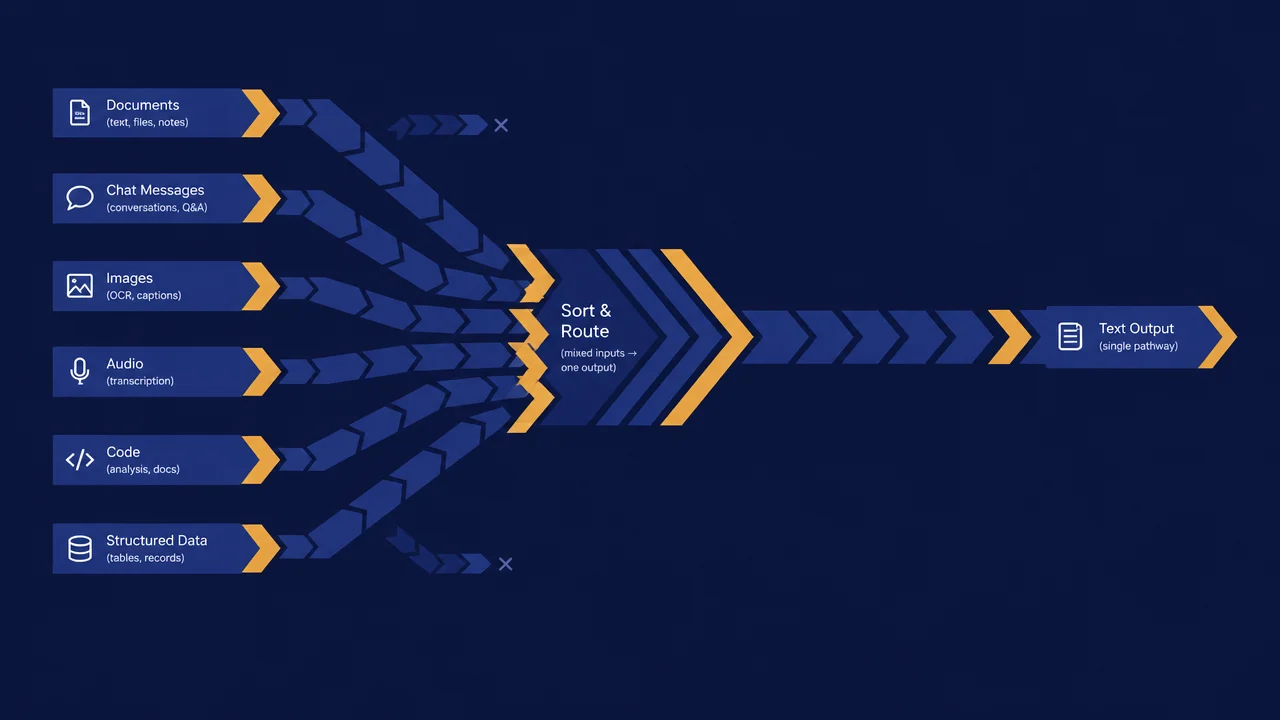
Capability boundaries: what text output can and cannot do
Think of gpt-6.2-sol as a pipeline that takes text in and puts text out. What the pipeline can do is clear: given textual context, produce a textual result. Tasks that can be handled directly around this include classification and labeling, summarization and rewriting, information extraction, question answering and generation, format conversion (for example, from free text to structured text you have agreed on), and ranking explanations for multiple candidate results.
Parts that require additional steps to fill in must also be recognized in advance:
- Those requiring strictly structured output: when calling through the Responses API, you can pass a JSON Schema via
text.formatand enable strict, so the return is generated directly according to the field definitions; when using Chat Completions, this option is unavailable and you can only rely on prompt constraints. Under Chat Completions, you must rely on prompt constraints plus server-side validation and retries; do not assume the first return will necessarily be parseable. - Those requiring up-to-date facts: the model's output is not equivalent to a source of facts. Content involving data, time, or external state should be provided by your retrieval layer or database, and then handed to the model to organize the wording.
- Those requiring non-text artifacts: image and speech generation are not within its output type and must be connected through dedicated steps.
- Those requiring deterministic behavior: the same request is not guaranteed to reproduce verbatim; parts involving strongly consistent logic should live in code, not be left to the model's judgment.
Writing the boundaries into the design document is much cheaper than patching them online afterward. Any step beyond text capabilities should be explicitly marked as "requires an external component," so that expectations do not become misaligned during review.

Key parameters and pricing of gpt-6.2-sol
The following is confirmed information when calling gpt-6.2-sol through HiAPI; the integration and cost estimates below are based on it.
- Positioning: the everyday workhorse tier of the GPT-6 series. OpenAI positions it as a common model suitable for everything from coding to driving agents at scale, smarter and more token-efficient than GPT-6.1 Sol.
- Context and output: context window 1,050,000 tokens, maximum single output 128,000 tokens.
- Knowledge cutoff: 2026-06-01.
- Output and capabilities: text output, supports streaming output and tool calling (
tools). - Calling methods: supports the Responses API (
https://api.hiapi.ai/v1/responses) and Chat Completions (https://api.hiapi.ai/v1/chat/completions). Thinking levelreasoning.effort(low / medium / high / xhigh / max, default medium) and JSON structured outputtext.formatare available only under the Responses API. - Pricing: current listed prices on the model page (per million tokens) are input $0.500, cached input $0.025, output $2.500, cache write (5 minutes) $0.625. Billing is subject to what is displayed in real time on the gpt-6.2-sol model page.
How to choose between it and gpt-6.2-astra
The same series' gpt-6.2-astra is the flagship tier, aimed at the hardest, longest-running projects and priced higher per unit. We recommend starting most tasks with Sol; when you encounter hard problems that Sol handles poorly, such as complex cross-module refactoring or high-demand specialized documents, switch to Astra. Both are called the same way; switching only requires changing the model name.
Interface information to confirm before integration
When integrating on HiAPI.ai, the model page /models/gpt-6.2-sol is the information entry point. It is recommended to check the following list item by item before writing the first line of calling code, and to rely on the official and platform documentation rather than guessing from community posts or configurations in old projects:
- Credentials and authentication method: where the key comes from, where it is stored, and how it is safely injected server-side; never deliver it to the browser.
- Request fields and required items: the exact naming and value constraints of fields such as model identifier, message structure, and maximum generation length.
- Context and output length constraints: gpt-6.2-sol has a context window of 1,050,000 tokens and a maximum single output of 128,000 tokens; how the output cap takes effect directly determines your chunking strategy.
- Rate-limit and quota dimensions: what dimension the rate limit is measured by (request count or token volume), and what form the response takes when triggered.
- Error code semantics: which errors are worth retrying and which are parameter problems where retrying is useless; these need to be distinguished.
- Pricing dimensions: this model is billed by token, and the model page separately lists the unit prices for input, cached input, output, and cache write.
Record these conclusions in the team's internal integration notes so the checklist can be reused directly when people or models change. Anything not yet confirmed should not be written into the production branch.

API calling and parameter organization essentials
The core work on the calling side is not sending a single request, but organizing requests into a wrapper that is reusable, observable, and degradable. Start with a minimal example: using the Responses API to get structured JSON. With the official OpenAI SDK, just point base_url to HiAPI:
from os import environ
from openai import OpenAI

client = OpenAI(base_url="https://api.hiapi.ai/v1", api_key=environ["HIAPI_API_KEY"])

resp = client.responses.create(
    model="gpt-6.2-sol",
    instructions="Extract fields from the ticket; fill missing fields with null.",
    input=ticket_text,
    text={
        "format": {
            "type": "json_schema",
            "name": "ticket",
            "strict": True,
            "schema": {
                "type": "object",
                "properties": {
                    "category": {"type": "string", "enum": ["billing", "bug", "account", "other"]},
                    "order_id": {"type": ["string", "null"]},
                },
                "required": ["category", "order_id"],
                "additionalProperties": False,
            },
        }
    },
)
print(resp.output_text)
If you already have a Chat Completions client, change the model name to gpt-6.2-sol to call it, but thinking level and JSON structured output are unavailable under Chat Completions. Then proceed in the following order:
Request structure
Split messages into two layers: system constraints and user content. The system layer holds the role, output format requirements, and prohibitions; the user layer holds business data. Do not concatenate business data and instructions in the same segment, otherwise when problems occur you cannot tell whether the issue is data or instructions.
Output contract
Clearly state the expected output shape (for example, field names and whether explanatory text is allowed). Even so, perform a parse validation on the server side: a parse failure should be treated as a failed call and go through retry or fallback, rather than passing a half-finished product straight to the frontend.
Exceptions and retries
Retries should only happen for recoverable errors, such as transient network failures or rate limiting. Errors like invalid parameters or overlong content are pointless to retry and should be reported directly. Retries need a maximum count and backoff interval to avoid amplifying one failure into a cascade.
Minimum observability set
Log at least the following for every call: latency, input and output token counts, whether a retry occurred, and whether the final result was success or fallback. These items determine whether you can later calculate costs and locate problems. An integration without logs is no integration at all.
Cost structure under token-based pricing
gpt-6.2-sol is billed by token, which means the cost of a single call is not a fixed value but accumulates linearly with input and output volume. What engineering needs to establish is a cost model, not a memorized number:
- Input side: system prompts, conversation history, and retrieved context all count. If multi-turn conversations are not trimmed, input keeps expanding with each turn.
- Output side: the longer the generation, the more you are billed. Requiring long explanations from the model makes costs rise uncontrollably.
- Total cost: the cost of a request is composed of both input and output, so optimization must look at both ends.
Corresponding control measures: streamline and reuse system prompts; apply a sliding window or summary compression to conversation history; split long documents first and feed them in as needed; set a reasonable output cap; deduplicate and cache batch tasks so identical inputs are not paid for repeatedly.
The right way to estimate budget is to run a batch of real samples, calculate average input and output token counts, and multiply by call volume to get an order-of-magnitude estimate. Current listed prices are in "Key parameters and pricing" above; prices may change, and billing is subject to what is displayed in real time on the model page.
Use side-by-side comparison to decide whether to switch
Model selection should not rely on a single evaluation or a single metric. A more reliable approach is to put gpt-6.2-sol and your current candidate models into the same batch of real business samples for comparison:
- Sampling: draw a representative set of requests from online logs or labeled data, covering common tasks and long-tail tasks.
- Unified input: same prompts, same batch of data, change only the model identifier to eliminate interference from prompt differences.
- Multi-dimensional scoring: look not only at scores but also at format compliance rate, failure rate, average token consumption, and average latency.
- Manual spot checks: expression quality and factual errors that machine metrics cannot capture need human review.
- Decision: define clear acceptance thresholds for switching, such as what levels of format compliance and failure rate must be reached before release.
The purpose of comparison is not to prove that the new model is better, but to answer "on the current tasks, do the benefits of switching cover the migration and operations costs?" If the gap is not significant, keeping the status quo is also a correct decision. Within the same series, you can include gpt-6.2-astra in the comparison for the hardest, longest-running tasks; for most tasks we recommend starting with Sol.
Common issues and troubleshooting paths
For high-frequency problems in the early integration period, troubleshooting in the following order is usually fastest:
- Timeouts: first check whether input is too long, causing processing time to rise, then whether it is network or server-side rate limiting. Prepare the fallback plan before the failure occurs.
- Truncated output: check whether the maximum generation length is set too small, and whether the system prompt demands overly long output. Truncation is often not a model problem but a parameter problem.
- Output format mismatch: confirm that the format requirements in the prompt are specific enough, and add validation and retries on the server side; if failures continue, consider switching to clearer example constraints.
- Authentication failure: check whether the key is injected correctly, whether the server-side key was mistakenly exposed to the frontend, and whether environment variables are missing.
- Rate-limit errors: confirm the rate-limit dimensions and thresholds, add backoff and queues, and avoid momentary concurrency saturating the limit.
The basic discipline of troubleshooting is: first determine whether the issue is request construction, server-side constraints, or business code parsing, and then make changes. Do not adjust parameters and hope for luck.
Monitoring and iteration after launch
Launch is not the end. Treat the integration as a continuously running chain, and watch at least these categories of metrics: call volume and success rate, format compliance rate, average input and output token counts, average latency, and the proportion of fallbacks and retries. They correspond to the four dimensions of capacity, quality, cost, and stability.
For iteration cadence, it is recommended to review failure samples and user feedback on a fixed schedule, turn typical errors into new evaluation cases, and adjust prompts, chunking strategy, and output caps accordingly. When the model or platform configuration changes, run a regression with the same batch of evaluation samples before deciding whether to expand traffic.
A usable launch principle: first verify real-world results with a small canary traffic, then scale up gradually, and always keep a switch to roll back to the old model. To look at model details and integration information first, start from /models/gpt-6.2-sol. Only by making the three things—capability boundaries, the cost model, and monitoring—solid at the same time can gpt-6.2-sol become a stable and reliable text component in your system.
Related articles
View all articles →-

Guide
gpt-6.2-astra Getting Started Guide: Text Model Capability Boundaries, Integration Essentials, and Cost Control
-

Guide
Tripo H3.1 Getting Started Guide: Choosing Among Three Input Modes, Parameters, and Pricing
A practical guide for developers on 3D generation integration decisions and cost control
-

Guide
Using qwen-image-2.1-turbo for E-commerce Product Images via the HiAPI API
A developer-first workflow for fast catalog visuals, transparent PNG output, and a working API request
9 min read