
Tutorial
Vidu Reference-to-Video API in Practice: Integration Essentials for 5 High-Value Business Scenarios
From asset structure to call chain: putting "reference image/video → video" into real business

On this page
Engineering Differences Between Reference-to-Video and Text-to-Video
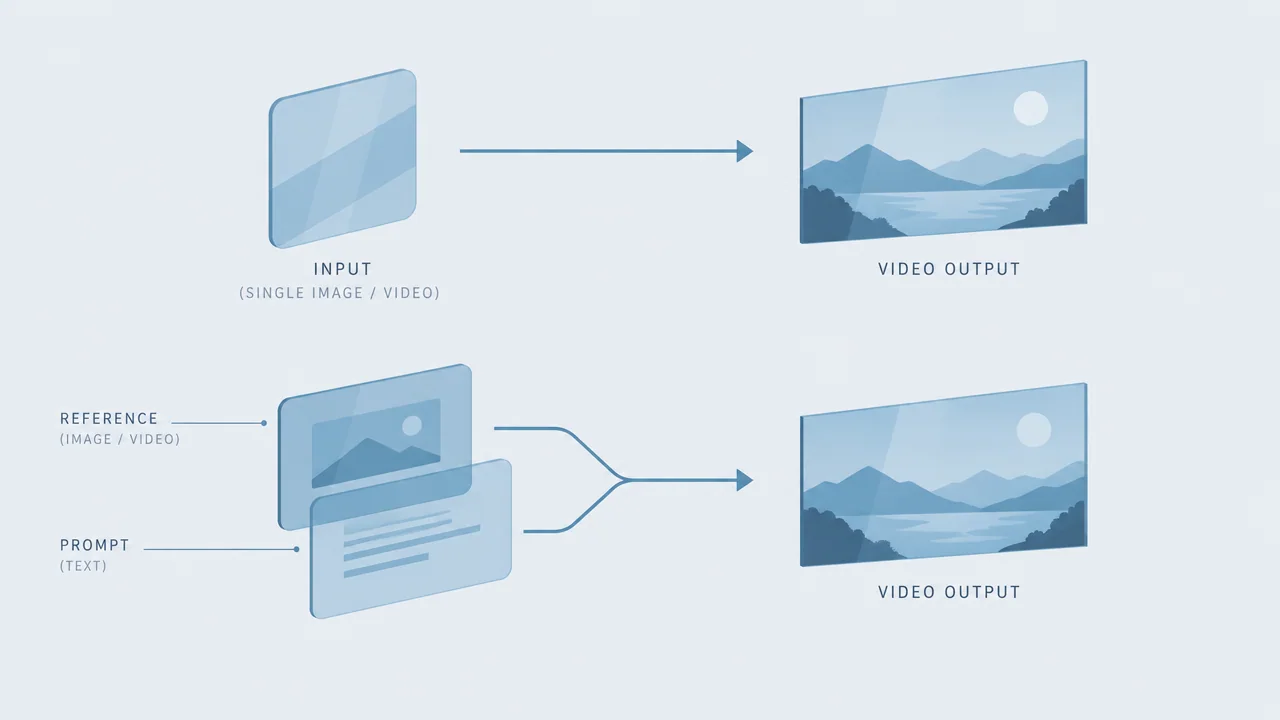
Before integrating vidu-q3-ad/reference-to-video into your business, the first thing to correct is an intuition: it is not "a better-written text-to-video," but a model with a changed input structure. The only input for text-to-video is a prompt, so the engineering focus naturally falls on prompt tuning; reference-to-video adds a reference asset branch—an image or video serving as the anchor for the subject and style—while the prompt degrades to describing "what should happen" rather than "what it looks like."
This difference directly rewrites the integration chain:
- Asset pipeline becomes a first-class citizen: Upload, validation, storage, and version numbers of reference assets must all be managed like prompt templates; otherwise, when the same code produces different results, you will not be able to attribute the cause.
- Prompt responsibilities narrow: Leave the subject's appearance to the reference assets; the prompt only describes actions, camera, rhythm, and scene, reducing the volatility of "the same sentence producing a different face every time."
- Output is still video: Asynchronous tasks, polling, and result persistence are the same as in text-to-video, so you can reuse your existing task framework.
Capability boundaries also need to be aligned in advance: what the model can guarantee is the continuity of the subject and style expressed by the reference assets in the final video, not pixel-level replication or conjuring up content that does not appear in the reference assets. For any scenario where the business requires "100% identical to the reference image," the acceptance criteria must first be downgraded to "subjective consistency meets the bar."
Therefore, the first question when deciding whether to integrate is not "is the effect flashy?" but "is the business value of subject consistency higher than the cost of a single generation plus manual spot-checking?" This criterion runs through all scenarios below.
Scenario 1: Multi-Version Copy Videos for Products and Ad Assets
Ad assets are the most direct application scenario for reference-to-video: product appearance is relatively fixed, and what is needed is multiple short video versions of the same product for A/B testing across different audiences, selling points, and placements.
Asset Preparation
- Maintain a set of primary reference assets for each product (multi-angle images or a showcase video) with a fixed version number, e.g.,
sku_1024_ref_v3. Updating assets means incrementing the version number, and old versions are retained for traceability. - Reference asset quality directly determines output quality: assets with a centered subject, even lighting, clean background, and no occlusion produce noticeably more stable videos. Do not mix different shooting batches of reference assets for the same SKU, or the subject's color and texture will drift across versions.
Call Chain
A minimal chain is: read the SKU reference assets → assemble a prompt by selling-point template (action, camera, scene, duration) → submit a generation task → poll until completion → write the result to the asset library with a three-part tag of "SKU + reference version + parameter set."
Producing multiple versions does not rely on repeatedly blind-tuning prompts, but on a parameter matrix: arrange and combine camera movement, scene atmosphere, and duration as controllable dimensions, run each combination only once, and record the results. This way, what you produce is not "a pile of videos," but "an explainable set of versions."
Version Management Essentials
Register each generation result as a record containing at least: reference asset version, prompt template version, generation parameters, elapsed time, and manual score. When the version quality for a selling point declines, you can answer within minutes whether "the assets changed, the template changed, or the parameters moved," rather than rerunning and hoping for luck. This registry itself is also the basis for cost estimation during subsequent batch scaling.

Scenario 2: Consistent Extension of Brand and Character Imagery
When the business need is "the same character/mascot/virtual spokesperson appearing repeatedly," the value of reference-to-video is most concentrated, but the applicability conditions are also the strictest.
Applicability Conditions
- The subject has a stable visual definition: Brand characters need fixed image guidelines (styling, color palette, proportions), and reference assets are the visual expression of these guidelines, not a casual sketch.
- Variation happens at the "scene and action" level: Short videos of the same character in different holidays, activities, and moods—the subject stays the same while the context changes. This is exactly the division of labor where reference assets anchor the subject and the prompt describes the context.
- Stylization is acceptable: If the business requires fully unified fine styling across shots, position reference-to-video as a tool for early proposals and asset supplementation, not as the source of final footage.
Failure Modes and Troubleshooting
The most typical failures in character scenarios are "subject drift" and "feature loss." The recommended troubleshooting order is fixed at three steps:
- Check the reference assets first: Are multiple conflicting reference versions being used simultaneously, or are the reference assets themselves insufficient in resolution with the subject occupying too small a proportion?
- Then check whether the prompt overreaches: A large amount of appearance description in the prompt competes with the reference assets for interpretive authority, causing inconsistency. Cutting the descriptive text down to only actions and context often improves things immediately.
- Finally check parameter jitter: What is the consistency distribution across multiple generations with the same assets and prompt? First measure the pass rate on a small sample, then decide whether a fixed parameter set is needed.
Do not use "run dozens more times and pick one" to mask instability—that converts troubleshooting cost into billing cost, and the problem remains.
Scenario 3: Re-Creation of Existing Assets and Pre-Cutting Supplements
Many teams already have shot footage on hand; what they lack are supplementary shots: a missing cutaway for a transition, an atmosphere clip for a voice-over, a showcase animation for a product page. Here, reference-to-video is positioned as "a supplier of assets for editing," not "a final-video generator."
Typical Uses
- Use keyframes or clips from existing videos as references to generate supplementary shots in the same style, filling gaps in the editing rhythm.
- Use product images as references to generate short dynamic showcase clips to insert at fixed positions in existing videos.
Continuity Considerations
- Visual continuity comes from parameters, not luck: Supplementary shots must closely match the original footage in composition, tone, and motion speed. These should be written into the prompt and parameter set, and compared side-by-side with the original footage after generation.
- Duration should match the editing gap: Reference-to-video is billed by output seconds, so generating 10 seconds and trimming to 3 is pure waste. Define the editing gap duration first, then submit tasks of the corresponding length.
- Interface consistency has limited scope: The first and last frames of supplementary shots will not automatically blend seamlessly with the original footage; transitions still need editing techniques (dissolves, cuts, music) to handle, and the integration plan must reserve this manual step.
Understanding this scenario as "supplying material to the editor" rather than "replacing the editor" makes expectation management much smoother, and acceptance criteria easier to write: as long as the generated clips can be cut into the timeline without the audience being pulled out of the experience, it passes.
Scenario 4: Interactive and Personalized Content Generation
User-triggered generation scenarios (e.g., entering a sentence to generate a short video featuring the user's own image or a pet's image) are extremely latency-sensitive, while reference-to-video is inherently an asynchronous task. This gap must be resolved at the architecture level.
Chain Design
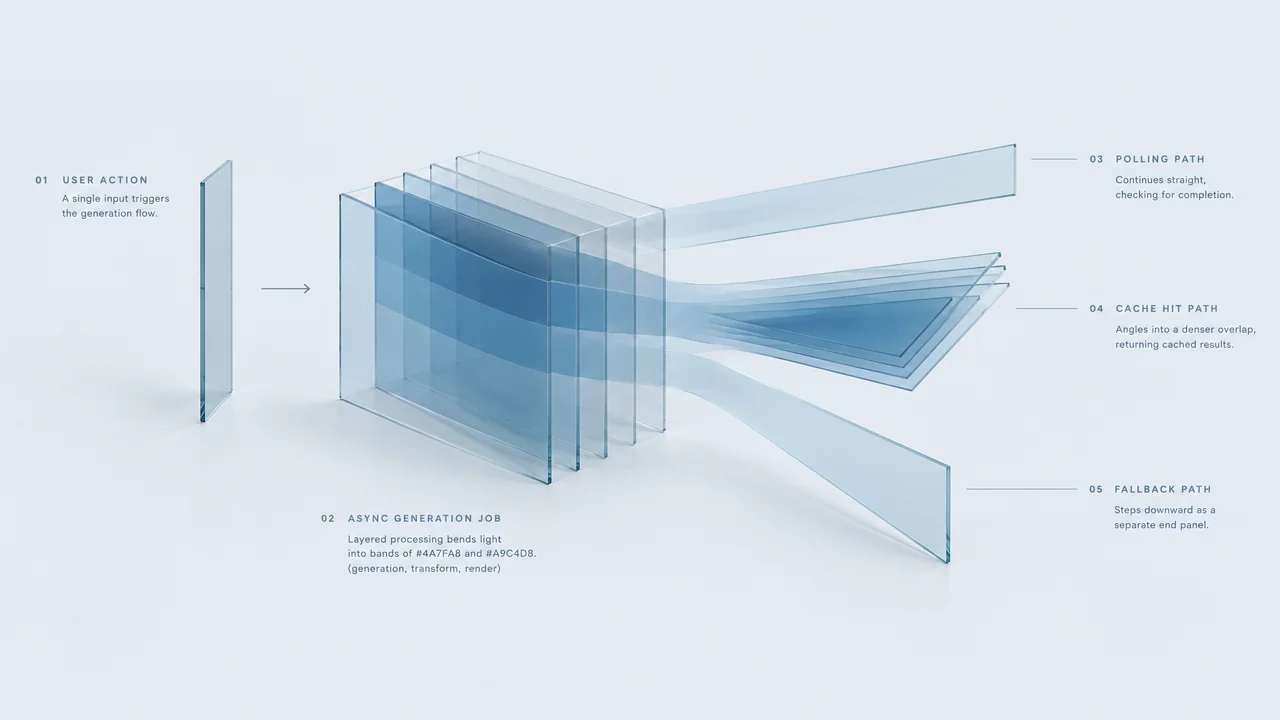
User action → parameter validation and quota check → submit generation task and immediately return task ID → frontend waits via polling or push → on completion, persist and return the playback URL. The key is to design "waiting" as part of the product experience, rather than pretending it is a synchronous interface.
Three Questions That Must Be Decided in Advance
- Wait limit: Set a timeout threshold for each task; on timeout, enter the failure branch and notify the user. Do not let users wait indefinitely.
- Result caching: Use "reference asset fingerprint + prompt + parameters" as the cache key. Identical inputs hitting the cache return historical results directly, saving duplicate billing and significantly shortening response time for repeat requests. In personalized scenarios, the probability of the same user making repeat requests is not low.
- Failure fallback: Do not retry in place until the end of time when a task fails. Configure a retry limit by business (1 attempt or fewer is recommended); beyond that, fall back to preset generic assets or static images to keep the user-side flow uninterrupted.
Also distinguish "user input" from "reference assets": the photo uploaded by the user is the reference asset, and a quality check (dimensions, subject visibility) should be performed before submission. Intercepting unqualified inputs at the entry point is much cheaper than letting a task fail halfway through.
Scenario 5: Quality Spot-Check Process for Batch Asset Production
The point of batching is not to generate a thousand clips at once, but to make the thousand have a predictable pass rate—and for you to continuously know what that pass rate is.
Layered Spot-Checking
- First-round full inspection of a small sample: Before launching a new parameter set or new reference asset version, run 10–20 clips and have a human review all of them to confirm subject consistency, action plausibility, and visual cleanliness.
- Proportional spot-checking during the stable period: Once the parameter set stabilizes, spot-check at a fixed proportion (e.g., 10% per batch), focusing on whether batch-level drift appears.
- Full inspection on anomalies: Once spot-checking finds systematic failures (e.g., a certain type of reference asset is generally distorted), review the entire batch and freeze the corresponding parameter set.
Scoring and Regression
Give each spot-check result a lightweight score (pass / needs fix / fail) and record the failure cause category: subject drift, action anomaly, insufficient image quality, duration mismatch. These categorized data are more useful than an overall score—they directly point to whether the next round should change assets or parameters.
The regression comparison method is: fix a batch of "golden samples" (both reference assets and prompts locked), rerun this batch after each parameter or template adjustment, and compare side-by-side with historical results. If the golden samples fail, the change introduced a regression; roll back first, then discuss optimization.
Manual cost must be included in the budget: spot-checking labor hours and generation billing are both marginal costs of this scenario. Batch scale should be derived backward from "how much the spot-check team can review," not determined by the API concurrency limit.
Cost Model and Pre-Integration Assessment Checklist
The billing basis for reference-to-video is per output second, meaning cost grows linearly with duration with no "longer videos dilute the unit price" effect. The estimation method is straightforward: single-run cost ≈ output duration × unit price × expected number of attempts, then multiplied by business volume. The key point is that the latter two are easily underestimated—retries and discarded clips are the parts most often out of control.
Three Hard Constraints for Cost Control
- Duration budget upfront: The product side defines the duration cap for each scenario type first, and the API layer validates it, rejecting anything over the limit. Trimming after generation is waste.
- Retry limit hard-coded: Hard-code the maximum number of attempts in the code, rather than leaving a "retry on failure" loophole. Quality issues should be solved through troubleshooting, not rerunning.
- Caching and deduplication: Do not resubmit identical inputs, deduplicate batch tasks by batch, and avoid generating the same asset repeatedly across different flows.
Pre-Launch Assessment Checklist
- Does the target scenario really depend on subject consistency? If you just need an atmosphere shot, text-to-video may be simpler.
- Do the reference assets already have a stable, standardized, versioned source? If not, establish asset standards first, then discuss integration.
- Does the small-sample consistency pass rate meet the threshold the business can accept? If not, do not proceed to batch.
- Have the output duration and retry limit been aligned on both the product and technical sides?
- Has the generation result registry (asset version, parameters, score) been implemented? Without it, subsequent optimization is impossible.
- Is there a clear manual spot-check arrangement and labor-hour allocation?
The purpose of this checklist is to break "can we use it?" into three independently answerable questions: "is it worth using, is it stable, and can we afford to maintain it?" Measuring the consistency pass rate on a small sample first, then discussing batch integration, is the safest path for this model to enter the production chain.
Common Failure Modes and Troubleshooting Order
When results fall short of expectations, the most common wrong reaction is to increase the number of calls. It is recommended to troubleshoot in the following fixed order, where each step eliminates one class of causes.
Step 1: Reference Asset Quality
Check whether the reference assets are clear, whether the subject is fully visible, and whether inconsistent versions have been mixed. The vast majority of "the subject doesn't look right" problems can be located at this step. Asset problems should not be solved by tweaking prompts.
Step 2: Consistency of Parameters and Prompt
Confirm whether the asset version, prompt template, and generation parameters are truly consistent within the same comparison. The most common engineering cause of "results are sometimes good, sometimes bad" is that someone secretly changed a default parameter or swapped assets without updating the version number.
Step 3: Whether the Prompt Overreaches
If the prompt is stacked with extensive appearance and style descriptions, it will conflict with the reference assets. Converge the prompt to actions, camera, and scene, and observe whether consistency recovers.
Step 4: Whether the Retry Strategy Masks the Problem
Check the logs for how many times the same task was retried and which category each failure fell into. If failures cluster around the same type of asset or the same parameter set, it indicates a systemic problem, and retrying only amplifies cost.
Step 5: The Task Chain Itself
Troubleshoot engineering-side issues such as timeouts, upload failures, and results not being persisted, separating them from model quality issues. The remediation actions for the two types of problems are completely different, and mixing them in troubleshooting will interfere with each other.
Writing this troubleshooting order into the team documentation stabilizes output more than any prompt trick—it ensures that whenever quality regresses, the team starts from assets and parameters rather than piling on more API calls.
Related articles
View all articles →-

Tutorial
gpt-6.2-sol in Practice: 5 High-Value Uses of a Text Model in Business
-

Tutorial
gpt-6.2-astra Practical Guide: Integration and Implementation Key Points for 5 High-Value Text Scenarios
A Developer's Checklist from Scenario Selection to Engineering Implementation
-

Tutorial
Tripo H3.1 Practical Application Scenarios: 5 High-Value Use Cases and Implementation Essentials
From text-to-3D to multiview reconstruction: choosing the right mode and parameters by business scenario