
Get an API Key
Create an API key in the HiAPI console to connect HiAPI in an agent tool.
Before connecting any tool, prepare an API key in the HiAPI console.
- Open HiAPI Console → API Keys. Sign up first if you don’t have an account.
- Use an existing key if you have one. Otherwise click Create key, give it a recognizable name, and set a spending limit if you want one. A spending limit is not a top-up; your account still needs a balance.
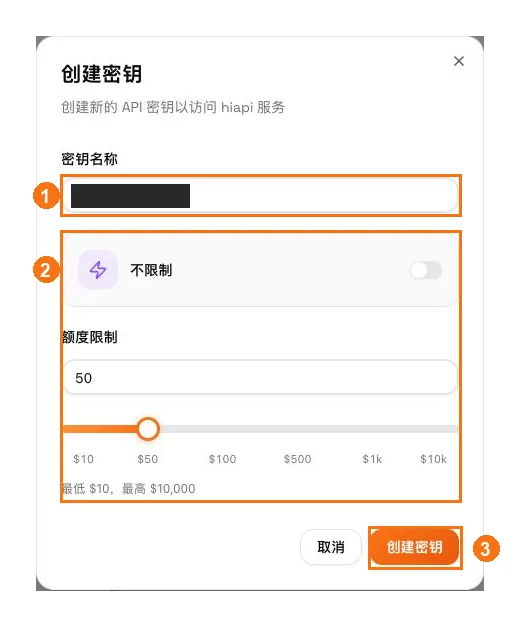
① Enter a key name; ② choose unlimited or a spending limit as needed; ③ click Create key.
- Click the copy icon next to the key to copy the full HiAPI API key. Don’t copy the masked value, and don’t paste the key into a chat.
Tools that use CC Switch one-click import (Claude Code, Codex CLI, Codex Desktop, OpenCode) only need you to pick a key on the connect page; the import carries it over, so there’s nothing to copy.
An agent tool calls the model many times in a row to finish one task, so it usually costs more than ordinary chat. We recommend creating a separate key for these tools and setting a spending limit on it: usage stays easy to see, and you don’t have to worry about overspending.
Guides write the key as YOUR_HIAPI_API_KEY. Replace it with your own key and paste it only where the tool asks for it. See Authentication for key groups and permissions.