
On this page
Trae
Add a custom model in Trae, choose the right API format for the model and fill in the address to use Claude, GPT, DeepSeek and other models through HiAPI.
Trae can connect to HiAPI through a custom model. Trae’s API format (API 格式) differs by protocol, and a model only connects if the format is right. There is one example for each: claude-opus-5-5 with the Anthropic Messages format and gpt-6-astra with the OpenAI Chat Completions format. This tutorial was verified on Trae 3.4.4.
1. Prepare a HiAPI API key
Prepare a key as described in Get an API Key, click the copy icon next to the key, and copy the full HiAPI API key to fill into Trae below.
2. Choose the API format
| Protocol | Choose in Trae | Suitable models |
|---|---|---|
| Anthropic Messages | Anthropic Messages format | Claude series |
| OpenAI Chat Completions | OpenAI Chat Completions format | GPT series, DeepSeek series |
| OpenAI Responses | OpenAI Responses API format | Scenarios that need Responses features |
The example models on this page have all been tested with the table above. For another model, choose the format from the table first, save and send a message to try it; if you get 400 does not support this endpoint, switch to another format.
3. Connect Claude (Anthropic Messages format)
3.1 Open the entry
Open settings in the lower left of Trae, find Models (模型) on the left, and click Add Model → Custom Model (添加模型 → 自定义模型).
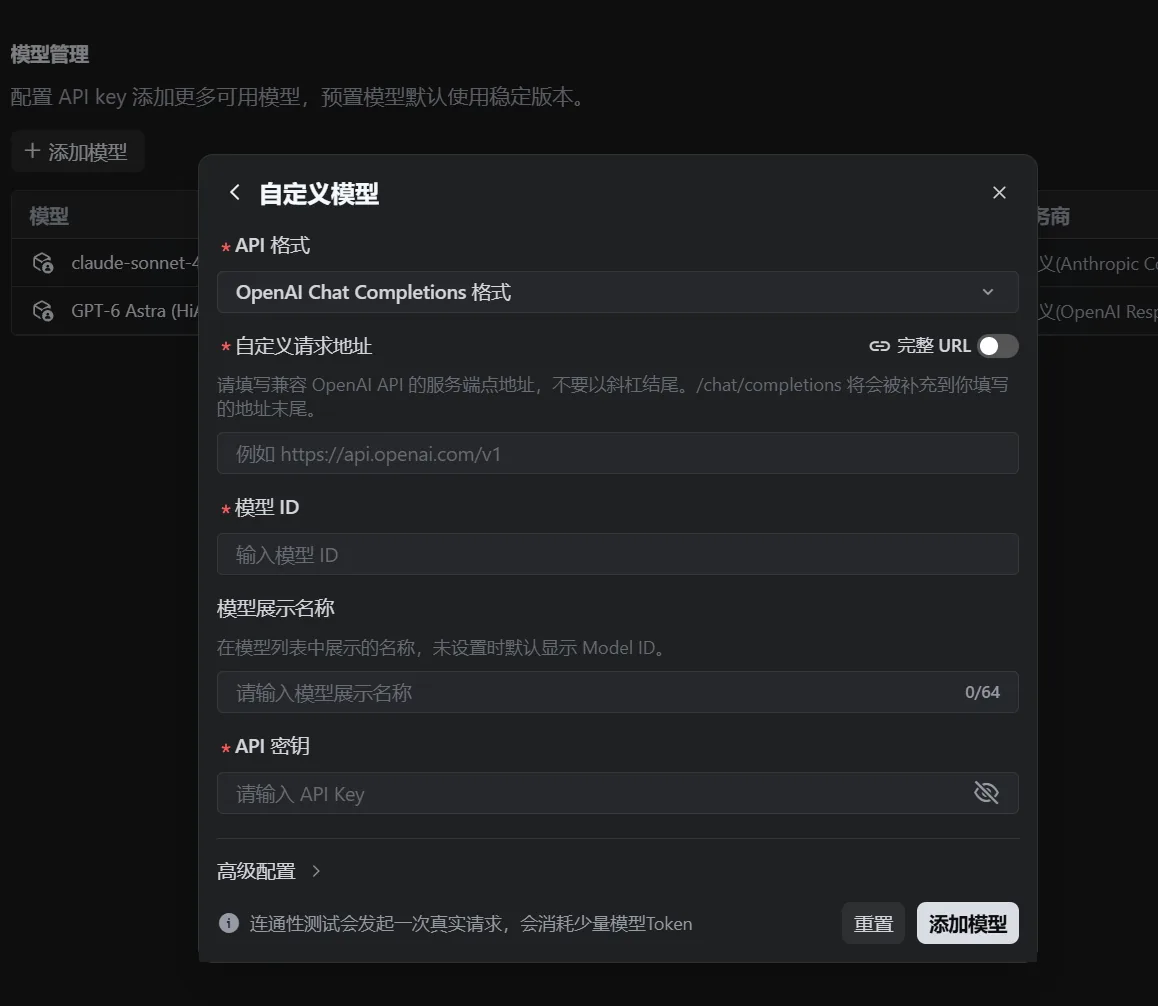
3.2 Fill in the fields
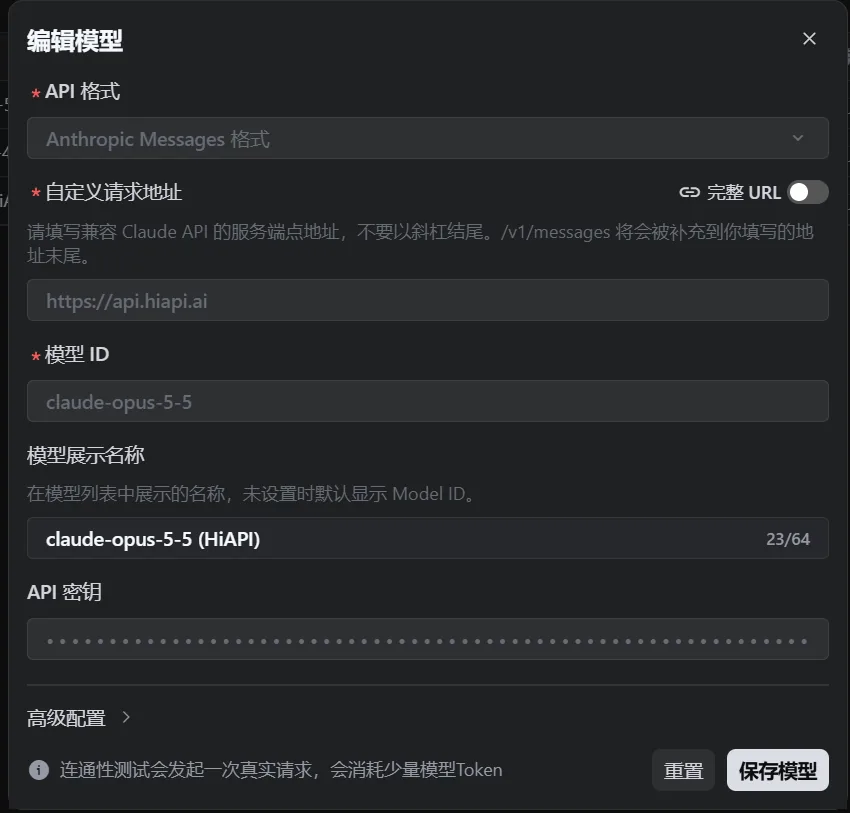
With claude-opus-5-5 as the example:
| Field | Value |
|---|---|
| API format (API 格式) | Anthropic Messages format |
| Custom request address (自定义请求地址) | https://api.hiapi.ai (without /v1) |
| Full URL (完整 URL) | Off |
| Model ID (模型 ID) | claude-opus-5-5 |
| Model display name (模型展示名称) | A name you’ll recognize, for example claude-opus-5-5 (HiAPI) |
| API key (API 密钥) | your HiAPI API key |
Trae appends /v1/messages to the end of the address automatically, so the final request goes to https://api.hiapi.ai/v1/messages.
3.3 Switch to another Claude model
Only change the model ID to the target model; leave the other fields as they are. See the model page for context length and max output.
4. Connect GPT and DeepSeek (OpenAI Chat Completions format)
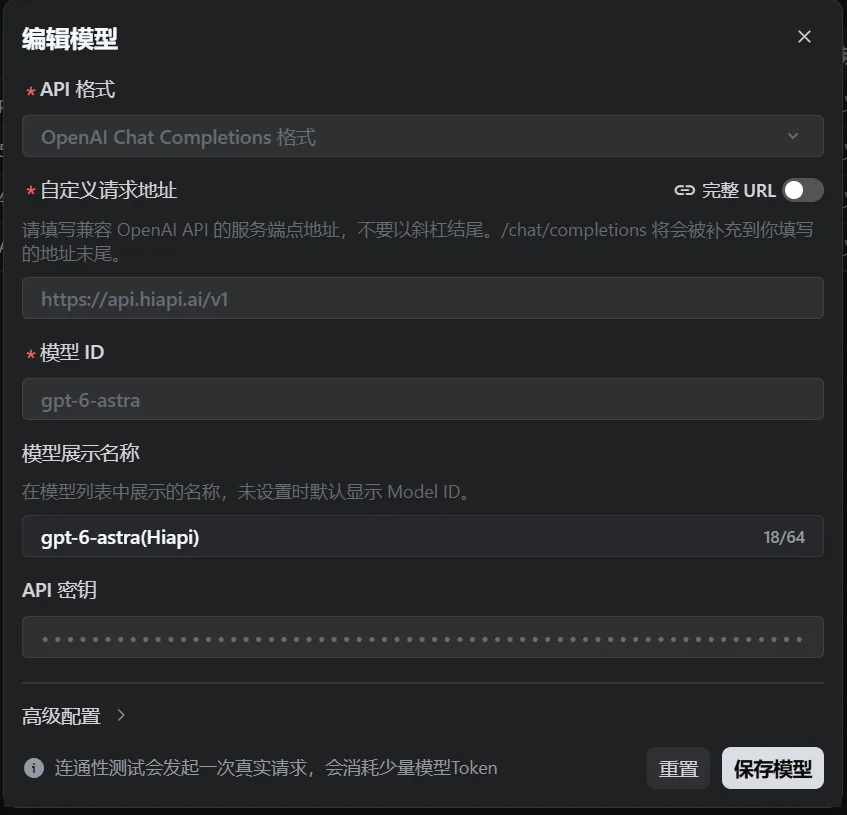
Enter the same way, via Add Model → Custom Model (添加模型 → 自定义模型). With gpt-6-astra as the example:
| Field | Value |
|---|---|
| API format (API 格式) | OpenAI Chat Completions format |
| Custom request address (自定义请求地址) | https://api.hiapi.ai/v1 |
| Full URL (完整 URL) | Off |
| Model ID (模型 ID) | gpt-6-astra |
| Model display name (模型展示名称) | A name you’ll recognize, for example GPT-6 Astra (HiAPI) |
| API key (API 密钥) | your HiAPI API key |
Trae appends /chat/completions to the end of the address automatically, so the final request goes to https://api.hiapi.ai/v1/chat/completions.
To use the Responses format, choose OpenAI Responses API format as the API format and also fill https://api.hiapi.ai/v1 as the address. This format only supports streaming output, so remember to keep streaming on.
5. Address cheat sheet
The path Trae appends changes with the API format, and a wrong address returns 404 straight away:
| API format | Fill in | Trae appends | Final address |
|---|---|---|---|
| Anthropic Messages | https://api.hiapi.ai | /v1/messages | /v1/messages |
| OpenAI Chat Completions | https://api.hiapi.ai/v1 | /chat/completions | /v1/chat/completions |
| OpenAI Responses | https://api.hiapi.ai/v1 | /responses | /v1/responses |
The rule: check whether the path Trae appends contains v1. If it does, don’t include v1 in what you fill in; if it doesn’t, include it yourself. Keep the Full URL (完整 URL) switch off so Trae appends the path; when it is on, you must enter the complete request address.
6. Verify
After saving the configuration, start a new session to test.
6.1 Chat
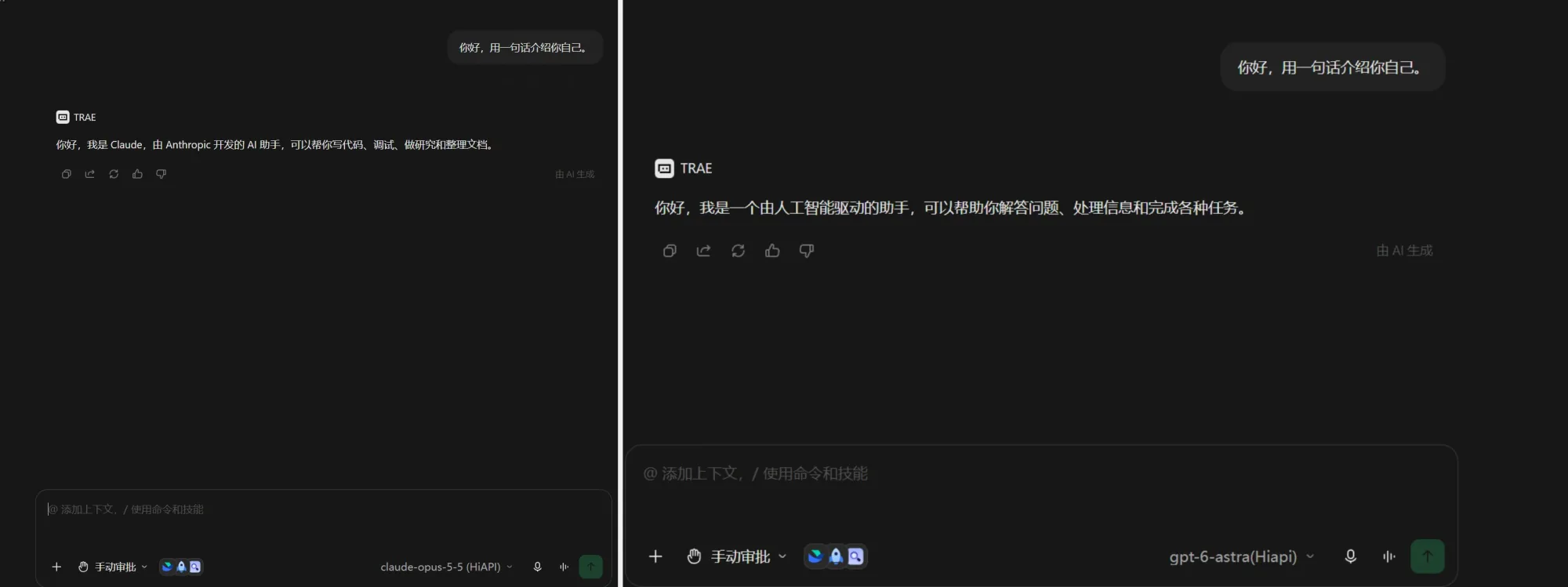
Switch to the model you just added and send “Hello, introduce yourself in one sentence.” A normal reply means the connection works.
6.2 Tool calling
First create tool-call-test.txt in the project folder open in Trae, write one line hello hiapi and save it. Then go to the task / Agent page and send “Only use the file reading tool once. Read the entire contents of tool-call-test.txt and return them exactly as they are. Do not modify the file, do not read any other files, and do not guess the contents from the file name.” A tool call appears and returns hello hiapi, so it passes. In testing, both claude-opus-5-5 and gpt-6-astra could chat and call tools normally.
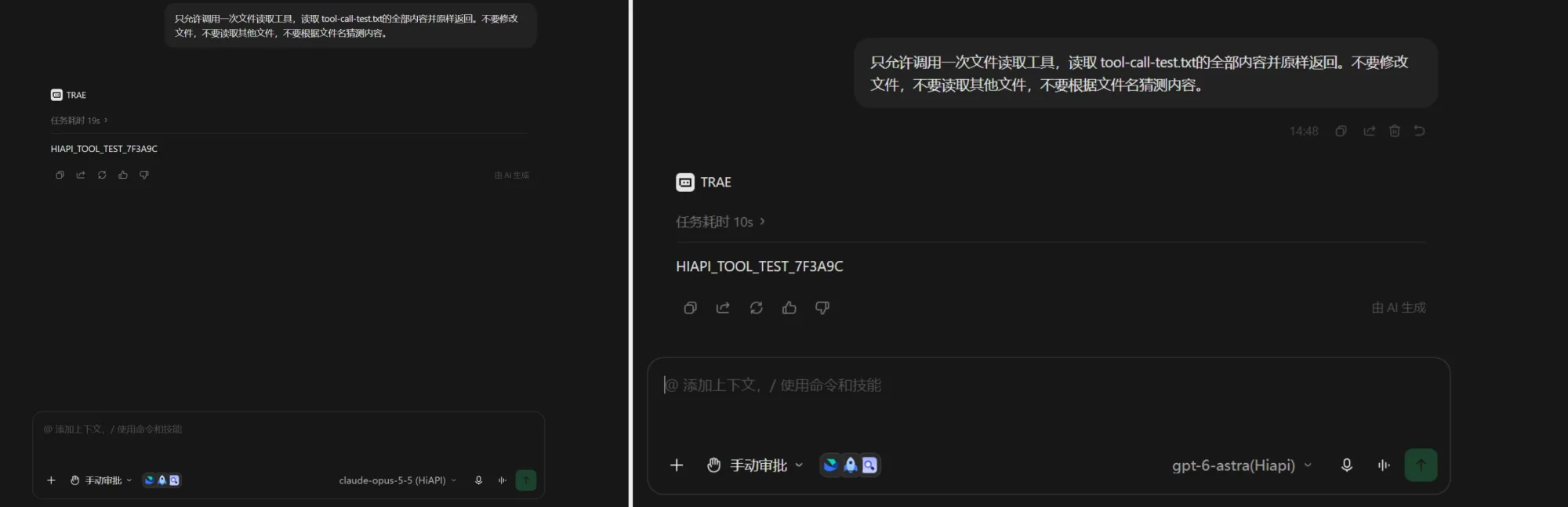
This tutorial only covers text model access; to let Trae call HiAPI’s image and video tools, see the Trae section of the MCP setup guide.
7. Troubleshooting
Only issues specific to Trae are listed here. For common errors such as 401, 404 and 429, see Common errors.
| Error | Cause | Fix |
|---|---|---|
| 404 | The address has an extra or missing /v1 | Fill it in according to the table in section 5 |
400 This model does not support this endpoint | The API format and model don’t match | Choose the Anthropic Messages format for Claude; choose the OpenAI Chat Completions format for GPT and DeepSeek |
| 401 / invalid api key | The HiAPI API key is wrong | Paste it again, with no spaces before or after |
Errors about max_tokens | Max output tokens is not set | Set a reasonable value in the advanced configuration; when gpt-6-astra uses Chat Completions, do not set max_tokens or temperature |
stream: must be true | This model only supports streaming output | Turn on streaming output |
| Spinning forever / timeout | A network problem, or the wrong API format | Check the network and confirm the API format is right |